Redesigning UniCreds' Loan CRM for a Multi-Party Lending Workflow
How I simplified lender operations, status visibility, task management, and internal coordination across an education-loan marketplace.
UniCreds helps students compare and process education loans while coordinating with multiple lending partners. A single application moves through two different working environments: the internal UniCreds CRM and the lender-facing portal. That's a bigger problem than UI cleanup. The same application means different things to different users, status vocabulary is too granular for some stakeholders and too vague for others, and a closed application can leave stale work behind if nobody cleans up after it.
Four ideas shaped the redesign
- 01One underlying application journey, multiple role-appropriate views.
- 02A simplified status layer for visibility, while keeping granular operational statuses underneath.
- 03System-driven transitions and notifications wherever the next action is deterministic.
- 04Explicit handling of edge cases, so closed or duplicate applications don't stay operationally "alive."
The work grew from journey mapping and Figma redesigns into lender-side workflow, notification and task-management improvements. The lender CRM now runs live across 20+ lenders.
The ecosystem
UniCreds operates as an education-loan marketplace. A student doesn't submit a form and get a binary yes or no, the journey runs through qualification, documentation, lender selection, application login, sanction, processing-fee confirmation and disbursal. And the same journey is worked by different organisations at once: students provide information, UniCreds teams qualify the lead and coordinate applications, lender users work their own applications inside their own context, and partners originate leads and need progress visibility without internal CRM complexity.
The CRM had to behave less like a conventional sales pipeline and more like a workflow orchestration layer between multiple parties.
The core problem
At first glance this looked like a CRM redesign. The deeper problem was state coordination. A lead could be active inside UniCreds while one or more lender applications existed underneath it. Lenders needed enough granularity to work a case; internal teams and partners just needed to know where an application stood and what happens next.
Statuses described system state, not user intent
Operational statuses such as Under Discussion, Not Responding, Awaiting Docs and Future Date are useful to whoever's working the case. They're far less useful to a stakeholder who just needs to know an application is in a follow-up phase. Showing every backend status everywhere raised cognitive load; hiding the detail entirely made the CRM unusable for operators. The product needed both.
Two working surfaces created coordination gaps
UniCreds agents and lender users weren't doing the same job. A lender executive needed task-level follow-ups and application-specific notes. A UniCreds user needed an aggregated view across the student's journey, and potentially, multiple lender applications. Treating both as if they needed the same screen structure created information overload on one side and missing context on the other.
Manual follow-up created stale work
When an application was rejected or withdrawn, the business journey was effectively closed. But open lender tasks could remain in pending queues even though there was no valid next action, work that was technically incomplete but operationally meaningless.
Edge cases at scale
Several "exceptions" materially affected data and workflow quality:
- 01A duplicate application already exists.
- 02A lender has no matching product, or the student isn't eligible.
- 03The application is already processed elsewhere.
- 04The student requests withdrawal.
- 05The assigned lender executive is no longer available.
- 06An application needs to be revived before login.
- 07A lead returns into the ecosystem after previously being marked lost.
My role
I worked across product discovery, workflow design, UX, and requirement definition.
- 01Mapped the existing UniCreds and lender-side journeys.
- 02Identified gaps through user and workflow research.
- 03Defined information architecture for role-specific CRM views.
- 04Rationalised lender statuses into a simpler shared status model.
- 05Designed wireframes and flows in Figma.
- 06Defined backend mappings, triggers, task behaviour, and edge cases.
- 07Worked with engineering and business teams on implementation and iteration.
- 08Extended the model into partner visibility and operational controls.
A hierarchy of states
One of the most important decisions was separating granular working statuses from simplified application states. Instead of forcing every user to understand the lowest-level state, I treated the status model as a hierarchy.
Granular statuses stayed available where an operator needed to decide the next action. Simplified statuses could be used for summary views, reporting, partner visibility, and cross-system communication.
“Operator: what exactly do I need to do next? Stakeholder: what stage is this application in?”
That distinction became a design principle for the rest of the CRM.
Two views, one application
The CRM effectively had two fronts: an internal UniCreds view and a lender-side view. Rather than mirror the entire database on both surfaces, I defined the information around each user's job.
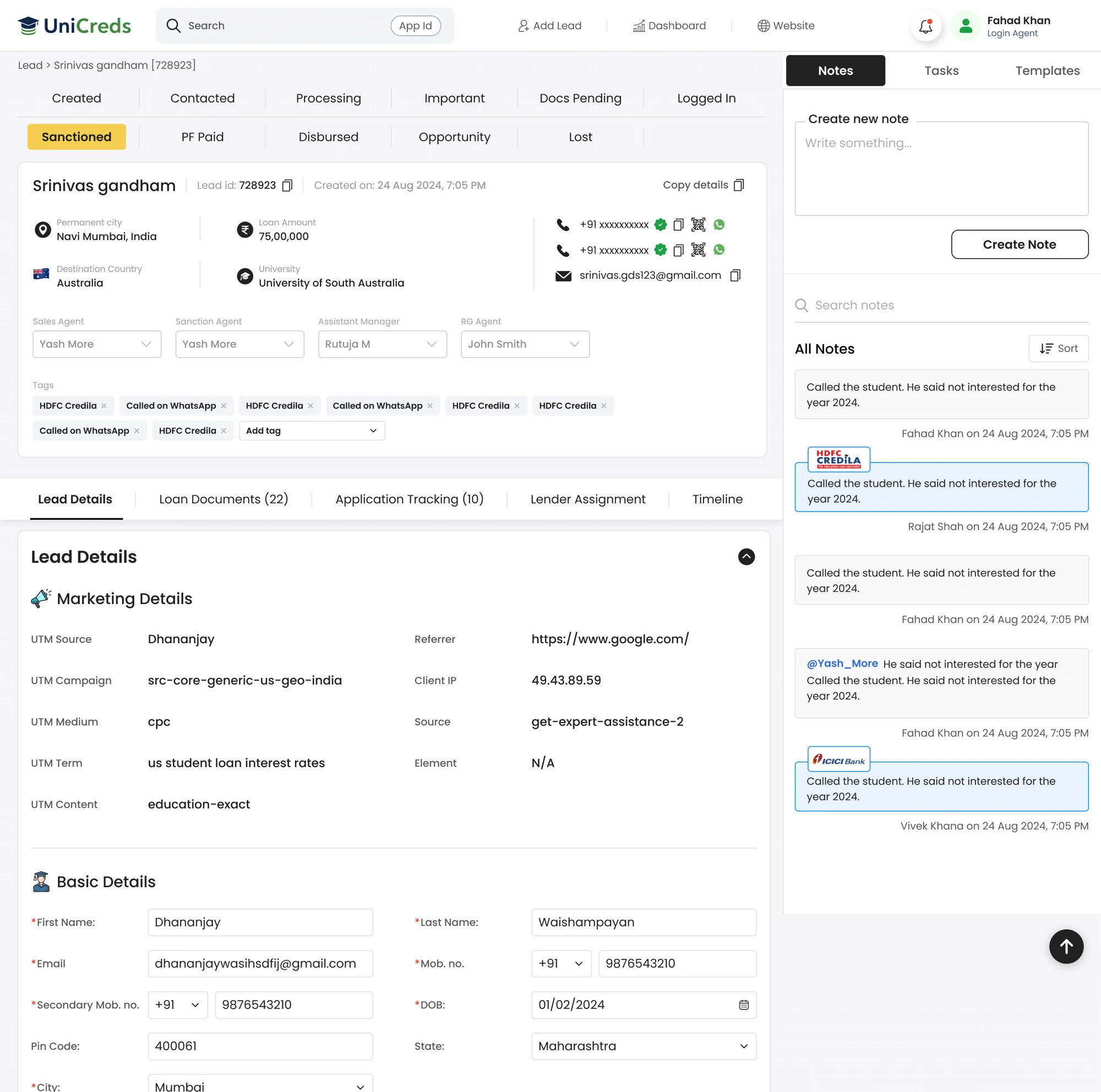
UniCreds view: orchestration
The UniCreds user needs to understand the student holistically:
- 01Student and admission context.
- 02Requested loan details.
- 03Documents and readiness.
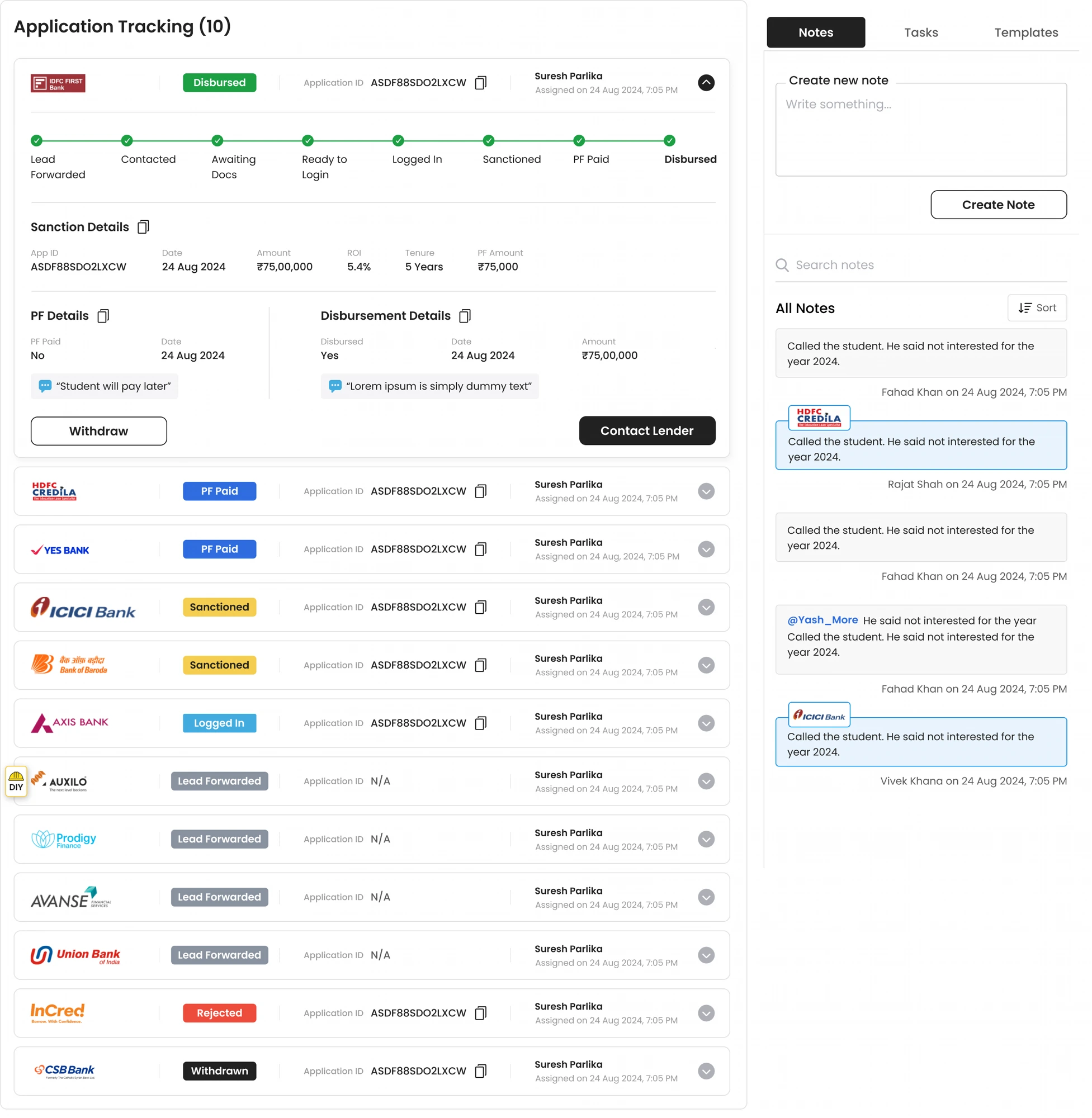
- 04Lenders the student has been forwarded to.
- 05Status of each lender application.
- 06Sanction, PF and disbursal milestones.
- 07Internal ownership and follow-up.
- 08Notes and history.
A student can have multiple lender applications, so the primary object from the UniCreds perspective is the student lead, with loan applications nested underneath it.
Documents as a readiness gate
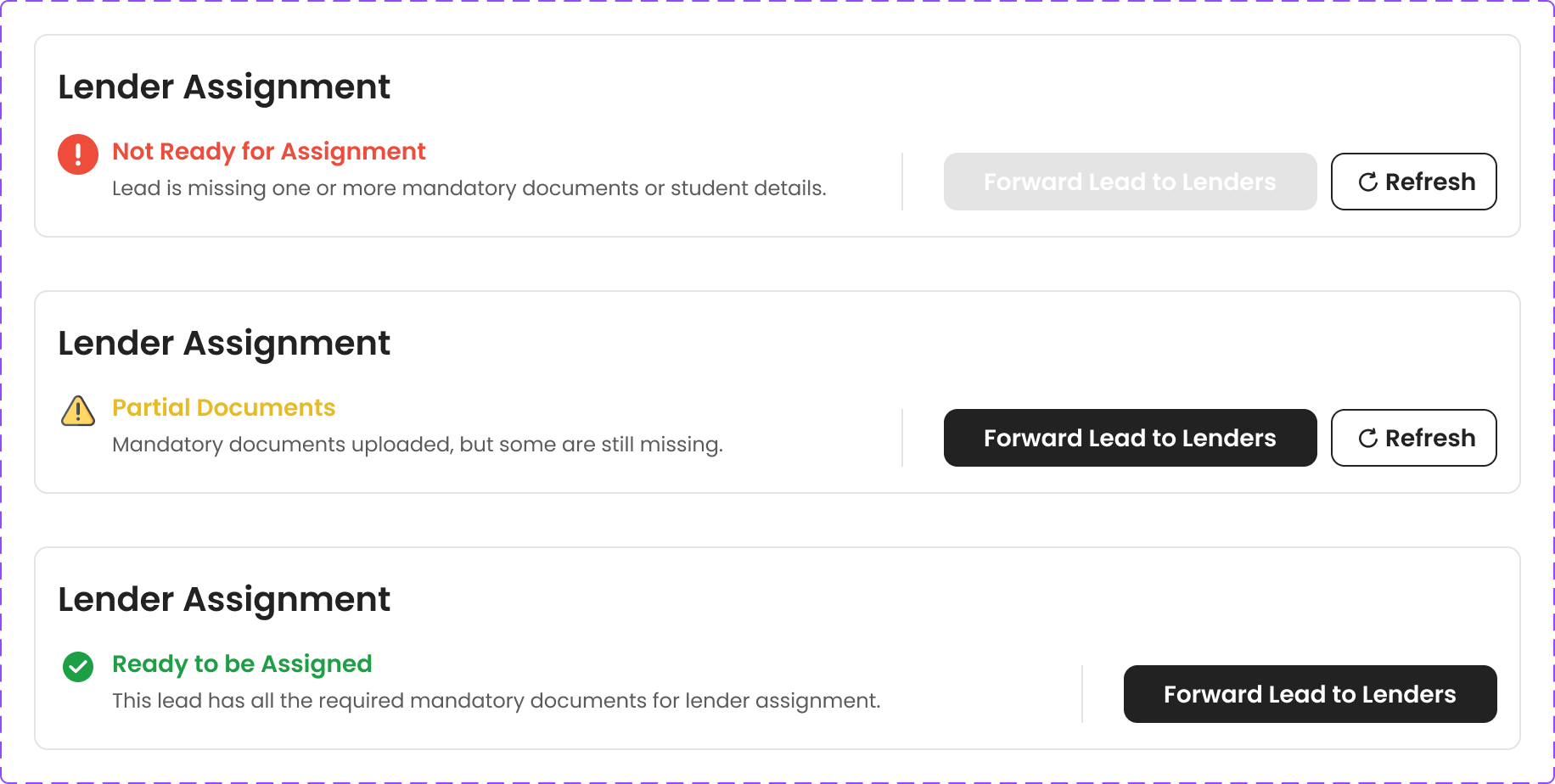
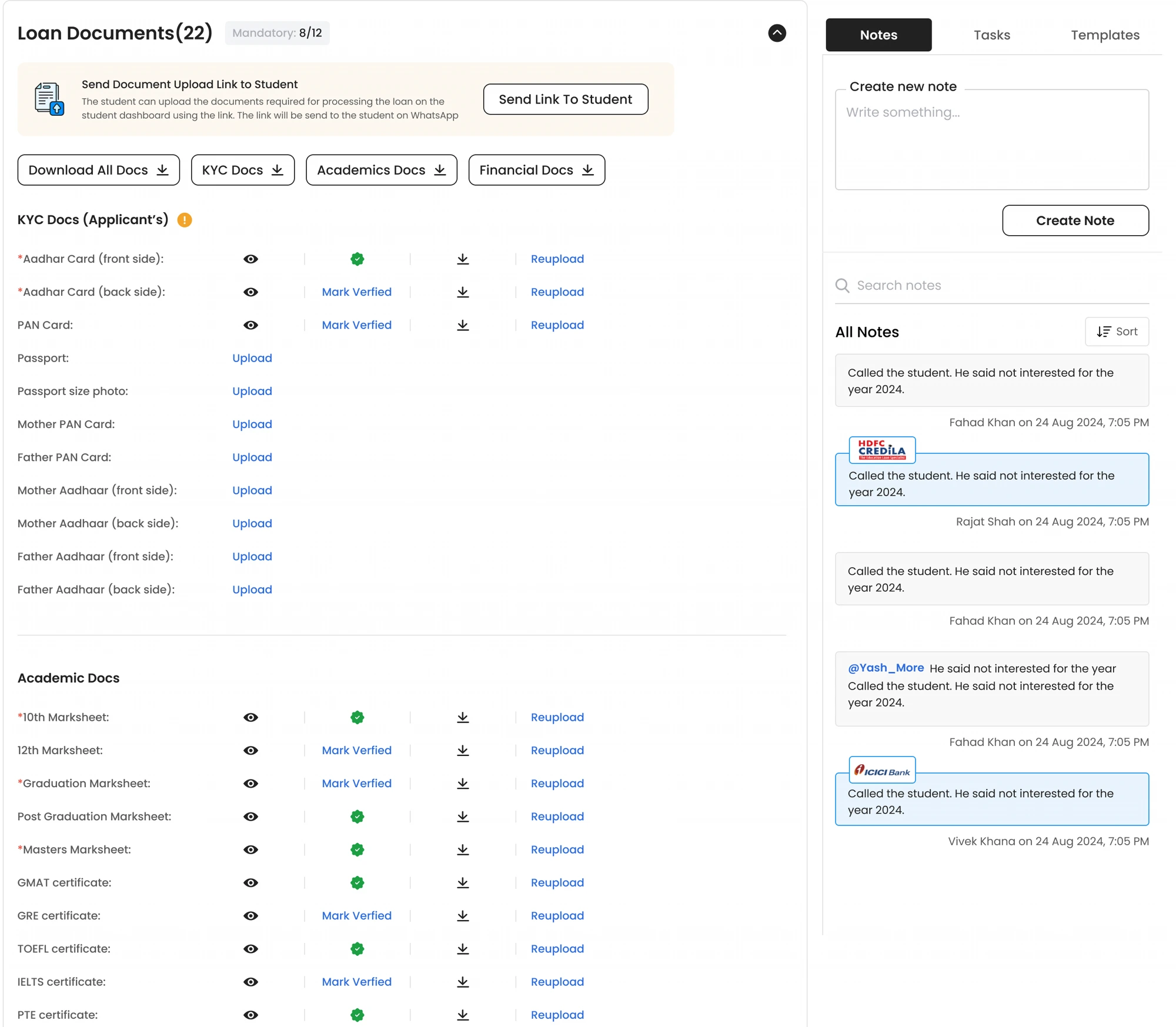
Documents weren't just files stored against a lead, they determined whether the application could move forward. Rather than a binary uploaded/not-uploaded flag, the system tracks readiness as Not Ready, Partial, or Ready, and only forwards an application to a lender once it qualifies.
Lender view: execution
The lender user works a specific application. Their questions are different:
- 01Which applications need action?
- 02What is the latest context?
- 03What task is due?
- 04What document or student response am I waiting for?
- 05What status should I move the case to?
For the lender, the application, not the overall UniCreds lead, is the main unit of work.
Making it event-driven
Status design alone wouldn't solve coordination. The next question was: when the system already knows what should happen next, why require another user to manually coordinate it?
Status updates as triggers
A status transition could drive downstream actions such as:
- 01Updating the mapped application state.
- 02Recording a system event in history.
- 03Notifying the relevant user.
- 04Surfacing a milestone to another stakeholder.
- 05Clearing work that's no longer actionable.
The goal wasn't to automate every interaction. It was to automate deterministic coordination, so people could focus on decisions and conversations.
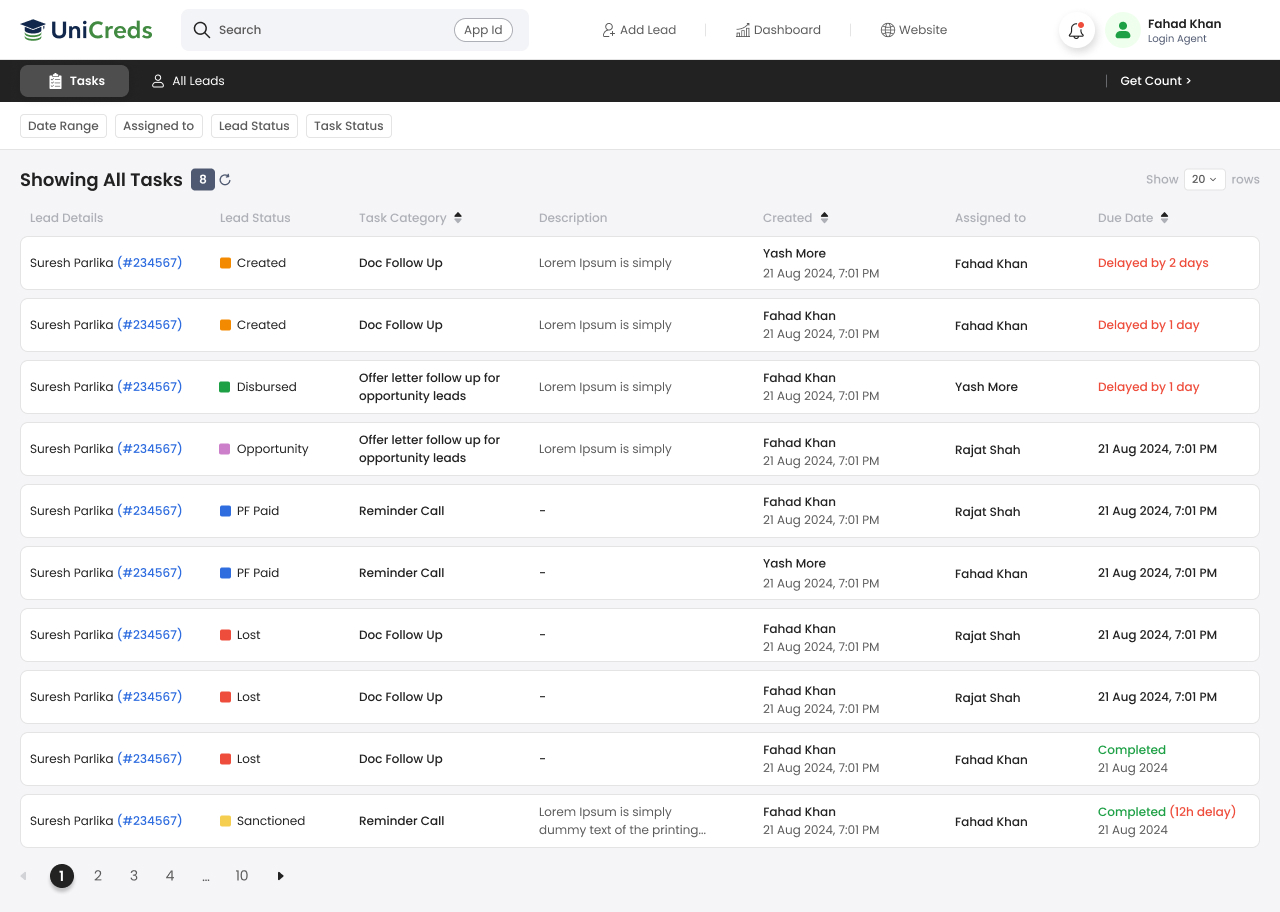
Tasks that stay actionable
Lender users use tasks to manage follow-ups. A task is useful while an application is active; it becomes noise once the application is closed.
The stale-task problem
If an application became Rejected or Withdrawn, open tasks linked to it could remain incomplete:
- 01Pending-task counts no longer represented real workload.
- 02Lender users had to manually clean up work that no longer mattered.
- 03Managers couldn't trust the task queue as an operational view.
The rule
When an application transitions to Rejected or Withdrawn, every incomplete task tied to that specific application is completed automatically. The rule applies across lender roles, preserves task history, and leaves other applications for the same student untouched.
The automation is scoped to the loan application, not the student lead. If the student has another active application with another lender, its tasks remain open, a small guardrail that stops one terminal lender decision from accidentally closing valid work elsewhere in the marketplace.
Rejection, withdrawal, recovery
Lost is a category, not a reason
The simplified Lost state groups multiple business outcomes: Rejected, Duplicate, No Product / Not Eligible, Already Processed. The underlying reason still matters, each outcome implies a different business interpretation even once the application is no longer actionable.
Withdrawn isn't the same as rejected
A rejection is a lender decision. A withdrawal is an operational decision to stop that application, for example when the student asks to withdraw, the assigned lender executive becomes unavailable or leaves the organisation, or another pre-login change requires the application to restart. Treating withdrawal as permanently irreversible forced teams to create a new application for recoverable cases, introducing duplicate records.
Revival before login
The improved flow allows a withdrawn application to be revived before the Logged In stage. On revival:
- 01The same application ID is retained.
- 02The application restarts from Yet to Connect.
- 03A different lender manager or executive is assigned.
- 04The previously assigned executive is excluded from reassignment.
- 05The revival is recorded in the application timeline.
Protecting the source of truth
Duplicates are especially damaging in a marketplace CRM: they create false workload, split notes across records, and distort attribution.
“If an active record already represents the real student or application context, new duplicate activity should enrich the active record rather than create a second operational truth.”
For example, when duplicate lead context is uploaded with a comment, the note is attached to the active lead rather than left on a repeated record nobody will work. The same principle carries into cross-system flows where a student leaves UniCreds, progresses elsewhere in the ecosystem, and returns again: duplicate detection couldn't be a simple "same phone number, reject" rule, it had to understand whether the existing record was active, terminal, or specifically awaiting renewal or reactivation.
Notifications without fatigue
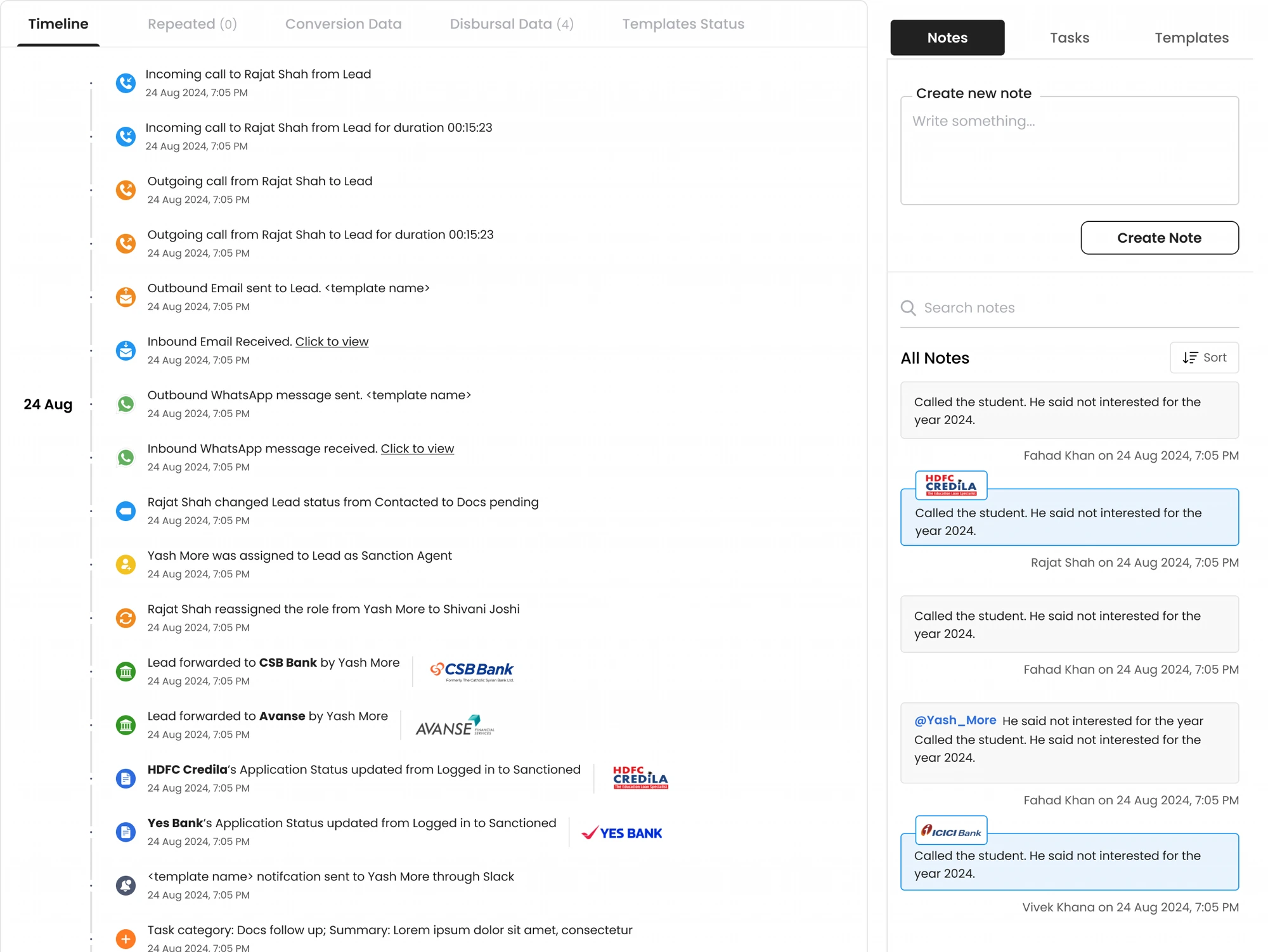
Visibility and notifications aren't the same feature. A note or milestone may need to be visible in history without deserving an email or Slack interruption, a distinction that mattered more as the CRM expanded to partners and additional internal teams.
“A notification should exist only when it changes someone's likely next action.”
For partner-visible notes, email is restricted to meaningful active stages such as Contacted, Docs Pending, Logged In, Sanctioned and PF Confirmed. Other notes stay visible in the portal without generating an email, and system-generated milestones improve transparency without turning every transition into a manual message.
Ownership and permissions
The CRM also needed to represent who owns what without letting users accidentally break routing logic, a rule that became especially visible when extending the system to partnership users.
A partner maps to one active UniCreds Partnership Executive at a time, while one executive can manage multiple partners. The mapping is enforced at the backend and every change is logged.
“Access and ownership should be derived from role and mapping, not from a user remembering the right filter.”
The same principle applies more broadly across the CRM: role-specific permissions elsewhere also stop users from performing actions outside their responsibility or skipping required workflow stages.
The resulting product model
The final model can be summarised as five connected layers.
The single customer-level record used by UniCreds.
One student can have multiple lender-specific applications.
Enough detail for the user actively processing the case.
A stable vocabulary for cross-system visibility and reporting.
Tasks, notes, notifications, role ownership, audit history and system automations attached to state changes.
This architecture stopped the CRM from becoming a flat list of fields and buttons. Instead, it established a clear relationship between state, ownership, visibility and action.
Adoption was the real signal, not a redesign checklist.
The CRM work moved beyond a one-time interface redesign and became part of the operating workflow between UniCreds and its lending partners. The clearest adoption outcome: the lender CRM now runs across 20+ lenders, backed by improvements to lender-side workflows, notifications and task management.
- 01A clearer shared language for application progress.
- 02A real separation between student-level and lender-application-level context.
- 03More reliable task queues.
- 04Less manual coordination for deterministic state changes.
- 05Explicit handling of rejected, withdrawn, duplicate and ineligible applications.
- 06Better visibility across internal and lender teams.
- 07A stronger foundation for partner-facing visibility and permissions built later.
I'd rather claim workflow adoption and operational integrity here than a conversion number I can't cleanly attribute to this redesign.
It's tempting to treat an internal tool as a screen-density problem. The hardest questions were about state: what it means, who can change it, what happens automatically, and whether the application can come back from it.
Lender users, internal teams and partners shouldn't see identical representations of the same application. The better model was a shared underlying state with role-appropriate abstraction on top.
Rejected, duplicate, withdrawn and ineligible records get less attention because the successful journey is more exciting, but they affect task queues, reporting, reactivation and trust.
The highest-value automations weren't flashy. They were the small rules that stopped one team waiting for another to manually communicate something the system already knew.
Duplicate leads, multiple lender applications, withdrawn revival, and cross-system re-entry forced us to define the real primary object, and when a record should be reused, renewed or closed.
The next iteration would focus on making the workflow more measurable, not simply adding more CRM controls. I'd instrument:
- 01Time spent in each lender status.
- 02Task ageing by application stage.
- 03Lender-wise status transition time.
- 04Applications requiring manual UniCreds intervention.
- 05Withdrawal → revival rate.
- 06Duplicate / repeated lead rate by source.
- 07Share of status transitions generated automatically vs manually.
- 08Notification-to-action rate.
- 09Drop-off between Ready to Login → Logged In → Sanctioned → PF Paid → Disbursed.
That would turn the CRM from an operational system into a stronger workflow intelligence layer, making bottlenecks visible by lender, stage and ownership instead of relying on anecdotal escalation.
The most useful change in this project wasn't a single screen. It was changing the mental model from:
“A CRM is a place where users update statuses.”
into:
“A CRM is a system that coordinates state, ownership, and next actions across multiple organisations.”
For a multi-lender education-loan journey, that distinction mattered. The system had to stay detailed enough for the person processing an application, simple enough for everyone else to understand, and strict enough that closed, duplicated or reassigned work didn't silently corrupt the operating queue. That became the foundation for the UniCreds CRM redesign and the lender and partner workflow improvements built on top of it.